Licensight MCP
The Licensight MCP server allows MCP-compatible AI assistants to retrieve Licensight component, vulnerability, and policy information.
The server is available at https://nttdata.licensight.com/mcp.
Create an access token
The MCP server uses a personal access token to authenticate requests.
- Open your profile menu in the bottom-left corner of Licensight.
- Select Access Tokens.
- Select Add to create a token.
- Enter a name, select the MCP Server permission, and select Save.
- Copy the token and store it securely. The token is only shown once.
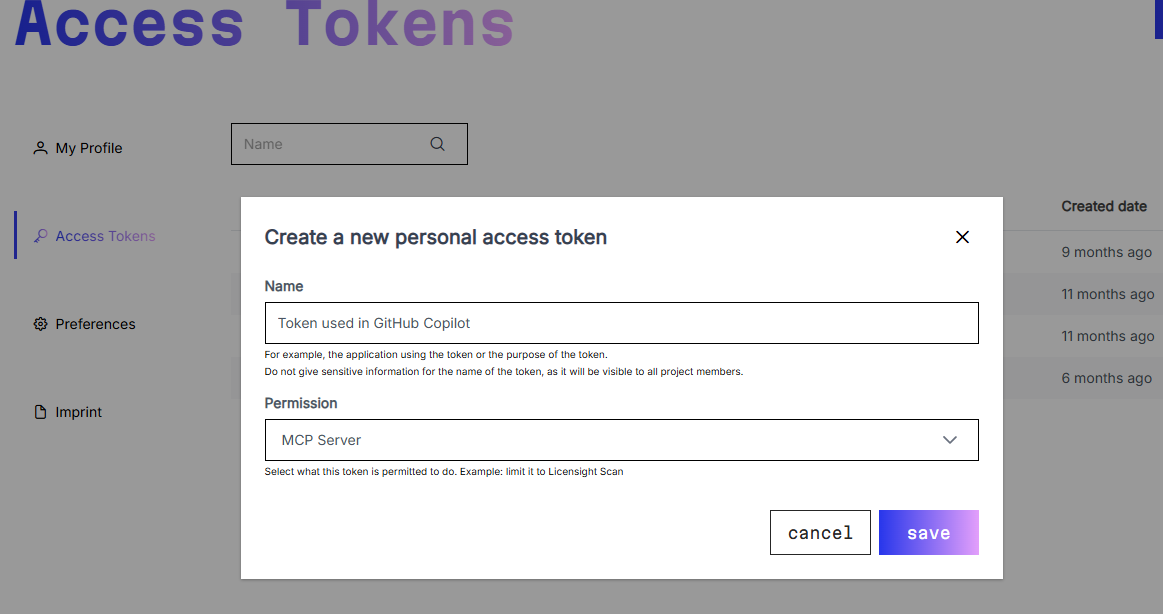
Every request to the MCP server must include the token in the following header:
X-API-KEY: <your-access-token>
Do not commit the token to source control or share it publicly.
Configure an MCP client
GitHub Copilot
Add the following server to your workspace .vscode/mcp.json file:
{
  "servers": {
    "licensight": {
      "type": "http",
      "url": "https://nttdata.licensight.com/mcp",
      "headers": {
        "X-API-KEY": "${input:licensight-token}"
      }
    }
  },
  "inputs": [
    {
      "type": "promptString",
      "id": "licensight-token",
      "description": "Licensight access token",
      "password": true
    }
  ]
}
Open GitHub Copilot Chat in VS Code and enable the Licensight MCP server when prompted.
Codex
Add the following entry to your Codex configuration file
(~/.codex/config.toml):
[mcp_servers.licensight]
url = "https://nttdata.licensight.com/mcp"
http_headers = { "X-API-KEY" = "<your-access-token>" }
Restart Codex after saving the configuration.
Claude Code
Register the server from a terminal:
claude mcp add --transport http licensight \
  https://nttdata.licensight.com/mcp \
  --header "X-API-KEY: <your-access-token>"
Use claude mcp list to verify that the server is registered, then start a
new Claude Code session.
Use Licensight MCP
After connecting, ask your assistant to use Licensight when you need information about open-source components or an application. For example:
- “Retrieve the Licensight information for
pkg:maven/org.apache.commons/commons-lang3@3.12.0.” - “Show the vulnerabilities for application
my-application.” - “Show the policy violations for application
my-applicationon branchmain.”
Recommended project instruction
Add the following instruction to a general instruction file, such as
AGENTS.md, so that your assistant checks new dependencies automatically:
Whenever a new package or component from any external dependency management
system is added, use Licensight to validate whether that package has any
vulnerabilities or policy issues using the retrieveComponent tool.